Using Standing Desks to Boost Calorie Burn and Energy Levels

By Nate Frost · Senior Editor
Published May 12, 2026 · Last reviewed May 12, 2026
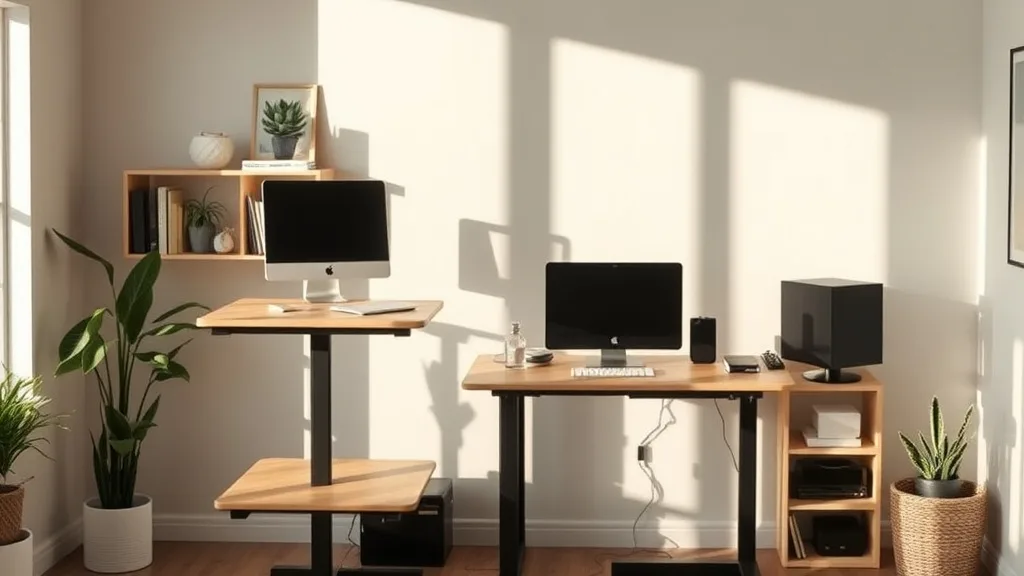
Standing desks have surged in popularity as a potential solution to counteract the sedentary nature of desk work. If you find yourself sluggish after hours of sitting, struggling with low energy, or concerned about calorie burn during your 8-hour workday, simply exchanging your chair for a standing desk might seem like a quick fix. However, for standing desks to truly help boost calorie expenditure and energy levels, it’s not just about standing; it’s about combining ergonomics, movement, and proper fit to your body. This article explores what standing desks can realistically do for you, how to optimize their use, and the common pitfalls to avoid.
What Are Standing Desks and How Do They Work?
A standing desk lets you work while standing up, either full-time or by alternating between sitting and standing with a height-adjustable model. The theory is that by standing, you engage more muscles, stimulate blood flow, and, as a result, increase calorie burn compared to sitting.
The increase in calorie expenditure isn’t massive—typically, standing burns about 10–20 more calories per hour than sitting. But over a full workday, this can add up, and when combined with small movements and stretches, the impact grows.
Ergonomically, a standing desk should be paired with a setup that supports your posture to avoid fatigue or pain: monitor at eye level, arms supported at an approximate 90-degree angle, and a neutral spine alignment.
See also: The Science Behind Standing Desks and Increased Productivity
How Standing Desks Impact Calorie Burn and Energy
Calorie Burn
- Standing vs. Sitting: Standing burns roughly 88 calories/hour vs. 80 sitting—a modest but measurable increase.
- Micro-movements: Fidgeting, shifting weight, or pacing can increase calorie burn further.
- Using anti-fatigue mats or balance boards: These encourage subtle leg muscle activation, augmenting calorie expenditure.
Energy Levels
- Increased blood flow: Standing reduces blood pooling in the legs, which can help reduce afternoon slumps.
- Movement breaks: Standing naturally facilitates movement, i.e., quick stretches or walking to meetings.
- Psychological alertness: The act of standing can promote alertness and reduce feelings of lethargy.
When and How to Use Standing Desks for Best Results
1. Calibrate Your Desk and Workspace Ergonomically
- Adjust desk height: Your elbows should bend roughly 90 degrees when typing or using a mouse, and your forearms parallel to the ground.
- Position your monitor: Top of the screen around or slightly below eye level, 20-30 inches away.
- Use an anti-fatigue mat: It softens the standing surface and encourages slight movements.
2. Gradually Increase Standing Time
- Start with 15-30 minutes of standing per hour.
- Work up to a target of 3-4 hours of standing spread throughout the day.
- Alternate frequently to prevent fatigue or joint strain.
3. Incorporate Movement and Posture Variation
- Shift weight from one foot to the other regularly.
- Incorporate light stretching or short walks during breaks.
- Use footrests or balance boards to engage leg muscles.
4. Pair with an Ergonomic Chair for Sitting Periods
- Ensure your chair offers:
- Adjustable seat depth (for tailored thigh support)
- Lumbar support with adequate adjustability range
- 4D adjustable armrests (height, depth, angle, width)
- Good ergonomic fit during sitting periods supports energy and prevents fatigue.
Common Pitfalls with Standing Desks
- Overstanding Fatigue and Discomfort: Standing too long or with poor posture causes lower back pain, leg cramps, or foot discomfort.
- Ignoring Ergonomics: Desk height not adjusted for your stature leads to shoulder, neck, or wrist strain.
- Expecting Immediate Results: Calorie burn from standing alone is modest; it’s the movement and gradual adaptation that yield energy benefits.
- Neglecting Fit and Comfort: An ill-fitting setup—whether standing or sitting—quickly causes fatigue, negating the benefits.
Practical Comparison Table: Sitting vs Standing Desk for Calorie Burn and Energy
| Feature/Aspect | Sitting Desk | Standing Desk | Best Use Scenario |
|---|---|---|---|
| Calorie Burn (Approx.) | ~80 calories/hour | ~88-100 calories/hour (with movement) | When focused on marginal calorie increase over long periods |
| Impact on Energy | Lower blood flow, potential lethargy | Improved circulation, alertness boost | When needing afternoon energy spike or alertness |
| Ergonomic Adjustability | Chair may have deep lumbar and armrest adjustability | Desk height adjustable but requires ergonomic chair plus setup | Extended use with alternating postures |
| Comfort Risk Factors | Potential for poor posture if chair not adjusted | Risk of leg/foot fatigue if standing too long or poor posture | When used with gradual standing intervals and aids like mats |
| Movement Encouragement | Minimal without breaks | More natural to shift, stretch, and move | Offices promoting active behaviors |
Conclusion
Standing desks can play a valuable role in improving energy levels and increasing calorie burn during long workdays when set up correctly and used smartly. They’re not a magic cure but part of a holistic strategy combining ergonomic fit, frequent posture changes, and gentle movement throughout the day. Pay close attention to how your body feels during transition phases, ensure your desk is calibrated to your height and needs, and remember to alternate sitting and standing along with engaging in light activity. This measured approach helps ensure standing desks actually improve your comfort, productivity, and health over time.
Frequently Asked Questions
Q: How long should I stand at my desk each day?
A: Aim for 3-4 hours spread throughout the day, starting with shorter intervals of 15-30 minutes to build tolerance.
Q: Will standing desks alone help me lose weight?
A: Standing burns slightly more calories than sitting, but significant weight loss requires additional movement or exercise.
Q: How do I know if my standing desk is set at the right height?
A: Your elbows should form about a 90-degree angle when typing, and your wrists should be straight. The monitor should be at or just below eye level about 20-30 inches away.