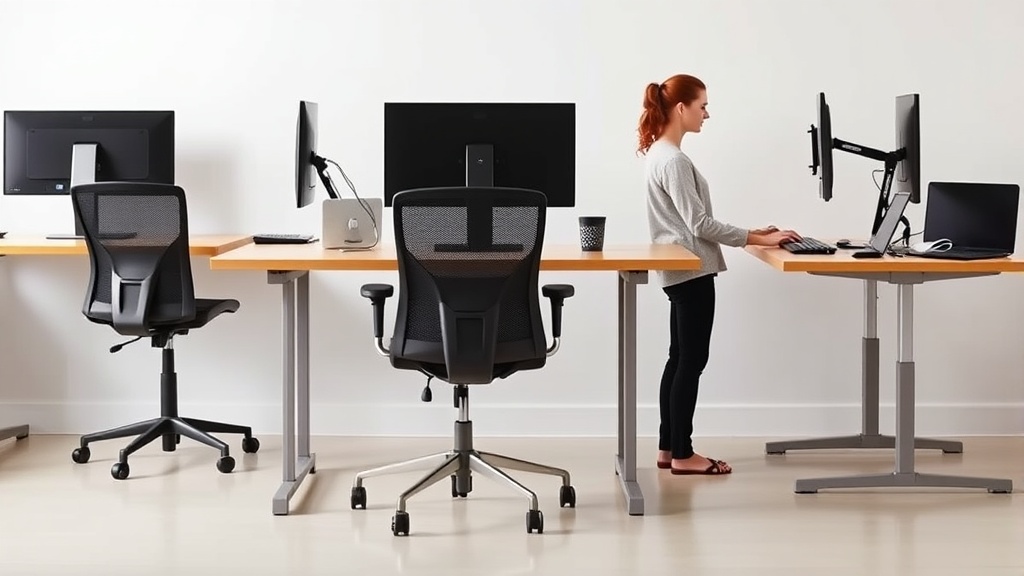
Tips for Maintaining Good Posture While Working from Home
If you’ve been working from home for extended periods, you probably face a common problem: discomfort from poor posture. Unlike the ergonomic setups many offices provide, home workstations often lack proper chair support, desk height, and monitor placement. This can lead to neck pain, aching shoulders, lower back discomfort, and even long-term musculoskeletal issues. The good news is that by adjusting your workspace and habits, you can maintain good posture throughout your workday, reduce fatigue, and improve focus.
This article lays out practical, evidence-based tips for creating a home office setup that supports your posture for typical 8-hour workdays, grounding advice in measurable ergonomic fit and real-world comfort—not just marketing phrases.
See also: Top Monitor Setup Tips for an Ergonomic Home Workspace
Understanding Good Posture: What It Is and Why It Matters
Good posture is about aligning your body so that muscles, ligaments, and joints are in the most optimal position to do their job with minimal strain. When seated, this means:
- Neutral spine alignment (natural S-curve)
- Even weight distribution across the sitting bones
- Head balanced directly over your shoulders
- Feet flat on the ground or supported
- Elbows close to the body and wrist straight while typing
Maintaining such posture for hours is easier when your chair and desk are ergonomically adjustable, especially seat depth, lumbar support, and armrests.
How Ergonomic Fit Affects Your Posture
Key chair and desk dimensions dramatically impact how long you can maintain good posture without feeling cramped or strained. Here are the three variables that make or break you while sitting for long work sessions:
1. Seat Depth (Measured Fit)
Seat depth is the distance from the backrest to the front edge of the seat. For ideal support, the seat should allow approximately 2-3 inches of space between the back of your knees and the seat edge. If the seat is too deep, it can push the backrest forward, creating pressure behind your knees and causing slumping or extended forward leaning. Too shallow, and your thighs won’t fully support your weight, increasing pressure on the sit bones.
2. Lumbar Adjustability Range
Lower back support should fit snugly into your lumbar curve, which varies among individuals. Chairs offering adjustable lumbar support that can move vertically and in intensity allow you to customize fit to your unique spine shape. Proper lumbar support maintains the natural S-curve and prevents slouching.
3. Armrest 4D Travel
Armrests adjustable in four dimensions—height, width, depth, and pivot—enable your elbows to rest close to your torso with relaxed shoulders. Without this adjustability, many desk workers find themselves either shrugging their shoulders or reaching to the keyboard, both of which contribute to upper back and shoulder strain.
Step-by-Step Tips for Maintaining Good Posture at Home
Follow these actionable steps to improve your posture and comfort throughout your workday.
1. Choose an Ergonomic Chair With Adjustable Fit
Invest in a chair with:
- Adjustable seat depth: Aim for a seat depth that matches your thigh length minus 2-3 inches.
- Lumbar support: Look for a lumbar pad or inflatable bladder with height and firmness adjustability.
- 4D armrests: Being able to adjust armrest position avoids shoulder tension.
- Tilt lock and tension: Your chair should allow a reclined position with some resistance for muscle relief.
2. Set Desk Height Appropriately
Your desk surface should allow your forearms to rest parallel to the floor—or slightly declined—when typing, with elbows at roughly 90°-110°. If your desk height is fixed and too high, adjust your chair height and use a footrest to keep your feet flat and knees bent at about 90°. This supports lumbar posture.
3. Position Your Monitor Correctly
Your screen should be at arm’s length and the top roughly at your eye level to prevent neck extension or flexion. If using a laptop, add a laptop stand and an external keyboard/mouse to maintain this neutral neck position.
4. Use Pressure Mapping or Subjective Feedback
Pressure distribution on the seat impacts comfort and posture. While pressure mapping technology isn’t always accessible, you can assess discomfort patterns subjectively: numbness or “hot spots” outside your sit bones suggest poor seat depth or cushion. Adjust your chair accordingly or use a cushion to redistribute pressure.
5. Take Regular Movement Breaks
No matter how good your setup is, sitting still for 8 hours will lead to muscle fatigue. Standing and stretching for even 2-3 minutes every 30-60 minutes restores blood flow and muscle elasticity, helping maintain posture when you return to your seat.
6. Strengthen Postural Muscles Outside Work Hours
Ergonomics helps prevent strain but doesn’t replace muscle strength. Incorporate exercises targeting your core, back, and shoulders to sustain the posture you maintain during work.
Comparing Ergonomic Chair Features: What Makes a Difference for Posture?
| Feature | Basic Office Chair | Ergonomic Chair with Adjustability | Impact on Posture | Ideal For |
|---|---|---|---|---|
| Seat Depth | Fixed, often too shallow or deep | Adjustable, 2-3” clearance behind knees | Prevents knee discomfort and slouching | All-day sitting (8+ hours) |
| Lumbar Support | Minimal or none | Adjustable height and firmness lumbar pad | Supports lumbar curve, prevents slumping | Lower back support need |
| Armrests | Fixed height and width | 4D adjustable armrests (height, width, depth, pivot) | Reduces shoulder/neck strain | Desk-intensive typing tasks |
| Backrest Tilt & Support | Limited tilt options | Recline with adjustable tension | Relieves spinal compression, encourages movement breaks | Long hours at desk |
| Cushion Material | Standard foam | Pressure-relieving, breathable foam or mesh | Improves comfort, reduces pressure points | Sensitive to pressure zones |
Common Pitfalls: Where Home Workers Go Wrong and How to Fix It
- Ignoring Seat Depth: Many settle for a chair just because it looks “comfy.” If the seat depth doesn’t fit your leg length, you’ll lean forward or slump out of comfort quickly.
- Skipping Lumbar Adjustments: Assuming a built-in backrest is enough is often false. Lumbar support needs tweakable range for actual benefit.
- Neglecting Armrest Positioning: Overlooked armrest fit leads to raised shoulders and neck pain. Adjust or remove armrests if they push you into awkward postures.
- Static Sitting Without Movement: Sitting still for hours kills posture benefits. Use alarms or apps to remind you to get up and move.
- Using Laptop Without Accessories: Laptops without keyboard/mouse and stands force neck strain and unnatural wrist angles.
Summary: Practical Tips for Better Posture at Home
- Select an ergonomic chair emphasizing seat depth, lumbar adjustability, and 4D armrests.
- Adjust your desk and monitor to maintain neutral body angles.
- Use subjective cues or pressure mapping to fine-tune chair comfort.
- Take micro-breaks to mitigate static muscle fatigue.
- Strengthen relevant muscles outside the workplace.
With careful attention to fit and behavior during your 8+ hour workday, your home office can transition from a pain point to a posture-friendly sanctuary.
Frequently Asked Questions
Q: How deep should the seat of my office chair be?
A: Ideally, the seat depth allows 2-3 inches (about a hand’s width) between the edge of the seat and the back of your knees to avoid pressure buildup and support good posture.
Q: How often should I take breaks to maintain posture?
A: Every 30 to 60 minutes, stand up, stretch, or walk for 2-3 minutes to reduce muscle fatigue and reset posture.
Q: Can I improve posture without buying an ergonomic chair?
A: Yes, by adjusting your current chair height, adding lumbar support cushions, using external keyboards or monitor risers, and emphasizing regular movement breaks, you can significantly improve posture even without a new chair.
