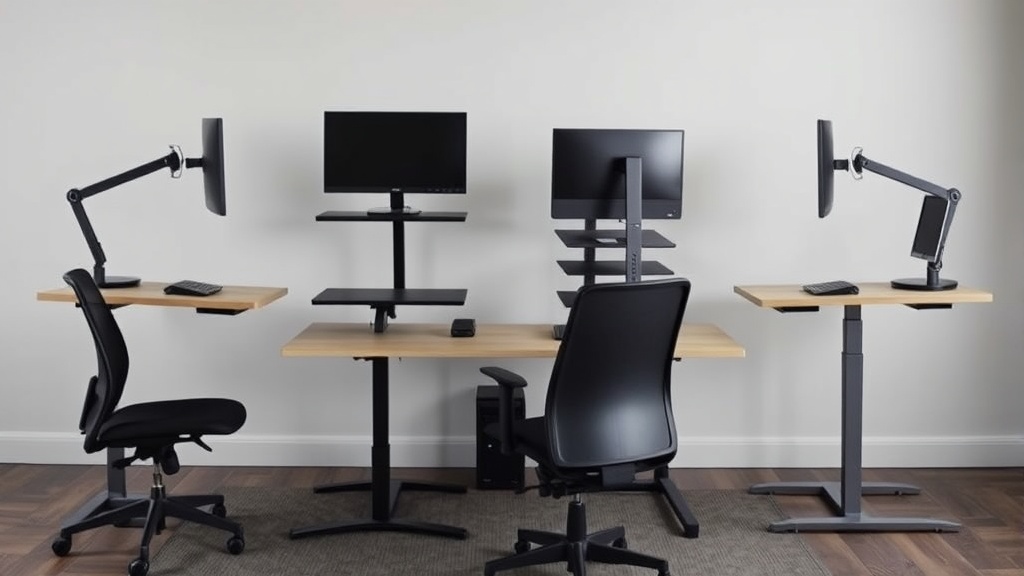
Choosing Adjustable Standing Desks for Varied Home Workstyles
If you work from home and find yourself switching between sitting, standing, and leaning throughout your day, you’re facing the challenge of selecting an adjustable standing desk that fits not just your space but your dynamic work habits. Many adjustable desks promise ergonomic benefits, but the reality of using one eight hours a day—across varied tasks, changing postures, and different times—often falls short without careful attention to fit, adjustability, and practical functionality.
What Is an Adjustable Standing Desk?
An adjustable standing desk is a workstation that allows you to alternate between sitting and standing positions by changing the desk height. Unlike fixed-height desks, these desks can be raised or lowered to suit your preferred ergonomic posture at any given task or time, helping reduce the health risks of prolonged sitting.
Most adjustable desks offer electric or manual height adjustment, with options for button controls or hand cranks. The ability to fine-tune the desk height encourages movement and variation in posture, which can contribute to better circulation, reduced back pain, and increased focus.
See also: 4. Humanscale Freedom: who it works for and who it punishes
How Adjustable Standing Desks Work
At the core, adjustable standing desks have lift mechanisms that raise or lower the desktop surface. These mechanisms come in several types:
- Electric motors: Powered by electricity, these allow smooth height changes at the push of a button, often with memory presets for quick switching.
- Manual crank: A hand crank rotates to mechanically raise or lower the desk. This is quieter and less costly but requires effort and time.
- Pneumatic or gas-spring systems: Rare for full desks but common in some tabletop models; these use spring-loaded adjustments with a lever.
Height adjustability ranges typically cover 22 to 48 inches, accommodating sitting to standing postures. The desktop sizes, weight capacity, and stability vary greatly, so matching these to your needs is critical.
When to Use an Adjustable Standing Desk: Varied Home Workstyles
Working from home often means juggling multiple activities: typing reports, attending video calls, drawing, or even casual browsing. Different workstyles require different desk heights and ergonomics.
- Computer-focused work (typing, emails, coding): Adjust desk height so your elbows are roughly at 90°, wrists are neutral, and your monitor is at eye level. Use an external keyboard and mouse for better wrist posture.
- Video calls and meetings: A standing position can keep you alert but ensure the camera angle and background look professional without forcing awkward neck bends.
- Creative or sketching work: Slightly higher desk heights or leaning positions can be preferable, simulating a drafting table.
- Reading or reviewing documents: Leaning or sitting may feel more comfortable, so integrate a padded office chair or stool.
Switching postures every 30 to 60 minutes is ideal, and this frequent change reinforces the need for an adjustable desk that offers smooth, easy adjustments within precise height ranges.
Key Ergonomic Features to Prioritize
When shopping for adjustable standing desks, look beyond the marketing hype. Pay attention to these three ergonomic fit factors that will determine all-day comfort rather than a “nice to have” quick height change:
| Feature | Why It Matters | What to Look For |
|---|---|---|
| Height range & increments | Match your body measurements for sitting & standing | At least 22” to 48” range; adjustments ~1” increments or continuous |
| Stability & weight capacity | Desk should stay steady at all heights with your equipment load | Supports at least 50 lbs stably without wobble |
| Control ease & presets | Frequent height changes require intuitive controls | Electric motors with preset memory buttons |
Additional adjustability like tilting desktops or monitor arms enhance ergonomics, but first, nail down the desk height control that matches your exact sit-stand needs.
Beyond Height: Practical Considerations for Home Use
The real test is using your desk through a full workday, not just a quick trial in a store or unboxing video. Here’s what to evaluate:
- Desk surface size: Will your laptop, external monitors, keyboard, mouse, and other essentials fit with enough working space? A cluttered or crammed desktop leads to poor posture and frustration.
- Desk footprint: Home offices often face space constraints, so measure your setup area and consider desk depth & width. Corner models or compact sizes might serve better.
- Noise: Electric motors vary in sound. A quiet lift is important if you share space or frequently have calls.
- Cable management: Many desks come with built-in solutions. Tangled cables can limit movement and disrupt the clean look.
- Assembly and durability: Read reviews on assembly complexity and long-term stability.
Common Pitfalls to Avoid
- Underestimating seat-to-floor height: For sitting, your chair height plus desk height must allow elbows at ~90°. An office chair without adjustable height or seat depth can sabotage your setup.
- Ignoring arm support: Adjustable armrests on your chair are crucial, but consider desks that allow the proper desk-to-armrest height ratio to avoid shoulder strain.
- Using the desk as a storage shelf: Added items like printers or heavy stacks clutter and reduce effective workspace and can destabilize the desk.
- Ignoring gradual transitions: If you are new to standing desks, sudden long standing hours can cause fatigue. Build up slowly and use anti-fatigue mats.
- Not considering pressure mapping: If you have access, pressure mapping tools can show how weight distributes at your workspace, informing chair and desk adjustments to minimize discomfort.
Comparison Table for Common Adjustable Desk Types
| Feature/Type | Electric Standing Desk | Manual Crank Desk | Gas Spring/Tabletop Riser |
|---|---|---|---|
| Adjustment Speed | Fast, smooth, with presets | Slower, requires physical effort | Quick, one-hand lever |
| Price Range | Higher initial cost | Generally lower cost | Lowest cost option |
| Noise Level | Low to moderate motor noise | Virtually silent | Silent |
| Weight Capacity | 100+ lbs typically | Usually 50-80 lbs | Varies, generally lower |
| Stability | Generally very stable | Stable but can wobble if unbalanced | Depends on model |
| Best Use Scenario | All-day shifting, professional home office | Budget-conscious users | Secondary setup or multi-use desks |
How to Choose the Best Adjustable Standing Desk for Your Home
- Measure your space and current equipment: Include chair height, monitor height, and desktop clearance.
- Identify your workstyle: Do you stand a lot, sit often, or do a mix? Consider tasks’ ergonomic needs.
- Check ergonomic specs: Look for sufficient height range, stable frame, and easy-to-use controls.
- Test if possible: Try the desk for a full hour, switching positions and simulating work actions.
- Budget realistically: Higher cost often equals better motor quality and build. If manual, consider your strength and willingness.
- Read long-term reviews: Look for consistent quality reports about wobble, motor life, and noise.
Keeping practical comfort at the forefront will help your home workspace improve productivity without discomfort or injury.
Frequently Asked Questions
Q: How often should I switch between sitting and standing at my adjustable desk?
A: Aim to alternate every 30 to 60 minutes to reduce fatigue and promote circulation.
Q: Do I need a special chair to use with an adjustable standing desk?
A: While not mandatory, a height-adjustable chair with armrests and seat depth adjustment complements the desk and improves ergonomics.
Q: Is it better to buy an electric or manual adjustable desk?
A: Electric desks offer fast, effortless height adjustments with memory presets, ideal for frequent switches and heavier setups, while manual desks are budget-friendly but require more effort to adjust. Choose based on your needs and budget.
