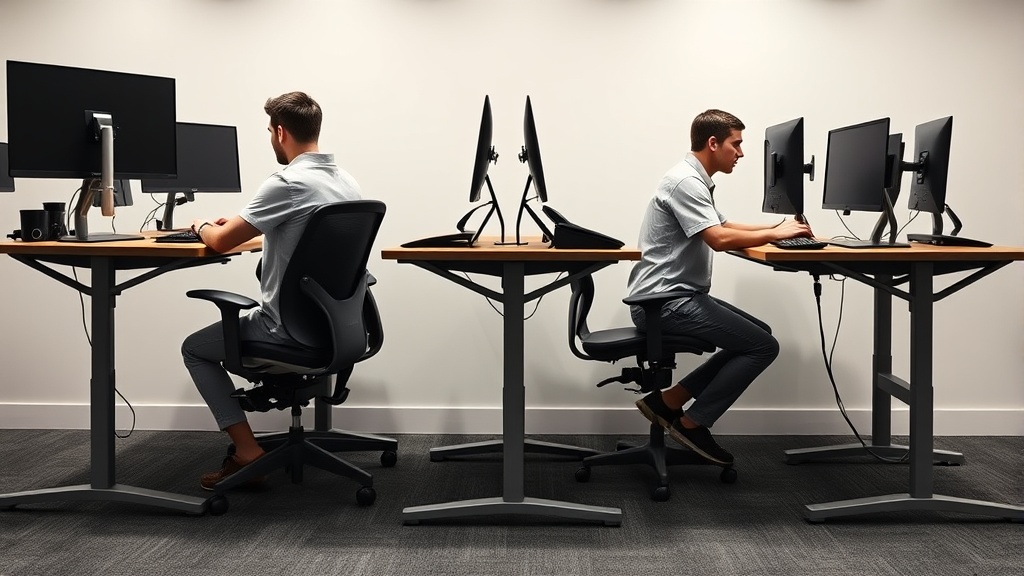
Sit-Stand Ratio: The Number Most People Get Wrong
If you’re a desk worker trying to optimize your sit-stand workstation for better health and comfort, you’ve probably heard that standing for 1 hour every 3 hours (a 25:75 standing-to-sitting ratio) is ideal. But if you follow this advice blindly, you might find yourself more tired, achy, or distracted after 8 hours at your desk. The problem? The “right” sit-stand ratio is much more individual—and complex—than a simple fixed number. This article breaks down what sit-stand ratio really means for your ergonomics and wellbeing, how to find a fit that works over a full workday, and why common advice misses the mark.
See also: Selecting the Ideal Monitor Arm for Flexible Positioning
What is Sit-Stand Ratio?
The sit-stand ratio describes how much time you spend standing versus sitting during your workday, commonly expressed as a percentage or ratio (e.g., 1:3 means stand for 1 unit of time, sit for 3). With the rise of height-adjustable desks, people universally accepted the idea that regularly switching postures helps reduce the dangers of prolonged sitting—like poor circulation, spinal compression, and fatigue.
However, despite its popularity, “sit-stand ratio” is often oversimplified in marketing and ergonomics advice, suggesting there’s a one-size-fits-all figure to improve focus, reduce back pain, and increase productivity.
How Sit-Stand Ratio Actually Works in Practice
The key insight is it’s not just the ratio you stand-to-sit—it’s how well your chair, desk, and body fit each posture during those hours. Let’s break down what matters.
1. The Importance of Proper Fit
When sitting, fit means having your chair’s seat depth, lumbar support adjustability, and armrest 4D travel tailored to your body size and desk height. A chair that’s too deep or shallow can cause you to slump or lose thigh support, increasing pressure points and fatigue. Lumbar support with an adjustable range ensures your spine stays neutral throughout the day—not just in theory but during the long sitting stretches.
When standing, it’s about your desk height and anti-fatigue mat presence, but also about micro-movements and varying your stance—and having a workplace calibrated to prevent upper body strain.
2. Pressure Mapping and Fatigue
Pressure mapping studies show that no matter how ideal your chair looks on paper, pressure points build up predictably with prolonged sitting—even in ergonomic chairs. This is where switching postures helps, but switching too infrequently or for too long standing can create new pressure points and muscle fatigue.
3. The Reality of the 8-Hour Workday
Think about your workday: you have deep focused tasks, intermittent meetings, snacking, and breaks. Your body needs a combination of dynamic movement, posture variation, sit-stand transitions, but also periods of relaxed sitting with lumbar and arm support.
Standing all day or following a fixed norm of “stand 1 hour every 3 hours” can make people underestimate muscle fatigue and upper body tension that quickly accumulate when standing unsupported or with poor desk fit.
When to Use Sit-Stand and How to Find Your Personal Ratio
The best way to approach your sit-stand ratio is to think like an experimenter and listener to your body, not someone chasing a generic “healthy number.”
How-to: Personalize Your Sit-Stand Ratio in 5 Steps
| Step | Action | Details |
|---|---|---|
| 1 | Assess your baseline sitting setup | Check chair adjustability: seat depth, lumbar support range, armrest 4D travel. Is it truly comfortable for prolonged sitting? |
| 2 | Add proper standing setup | Desk height adjusted for your elbow angle (~90°), anti-fatigue mat, and monitor height aligned. Is standing comfortable for short periods? |
| 3 | Start with short standing intervals | Try standing 10–15 minutes every hour and note physical sensations: fatigue, pressure areas, focus levels. |
| 4 | Adjust ratio based on feedback | If standing causes discomfort, reduce intervals and increase sitting with better posture support. If sitting causes back pain or fatigue, increase standing or movement breaks. |
| 5 | Incorporate micro-movements and breaks | Sitting or standing, get up to walk or do gentle movements every 30–60 minutes to reduce pressure buildup and improve circulation. |
Common Pitfalls in Sit-Stand Ratio Advice
- Fixing a ratio without fit: The best ratio can’t compensate for a chair that doesn’t support your lumbar curve or a desk that forces awkward wrist angles.
- Ignoring variability: Your ideal ratio changes daily depending on workload stress, fatigue level, and even clothing or footwear.
- Standing still for too long: Standing itself can cause leg discomfort and lower back strain if you don’t shift weight or wear supportive shoes.
- Using marketing copy as gospel: Ads promoting “perfect” stand time for health rarely acknowledge the nuance and personal trial it takes to find balance over an 8-hour day.
Sit vs Stand: Key Features and Considerations
| Feature | Sitting (Ideal) | Standing (Ideal) | Why It Matters |
|---|---|---|---|
| Posture Support | Adjustable lumbar support, correct seat depth, armrest 4D travel, feet flat on floor or footrest | Desk height allows elbows at about 90°, monitor at eye height, anti-fatigue mat reduces leg strain | Proper posture support prevents fatigue, pressure points, and musculoskeletal problems |
| Movement | Micro-movements: posture shifts, small fidgeting | Weight shifting, foot placement variation, occasional stepping or walking | Keeps circulation flowing, reduces buildup of pressure and stiff muscles |
| Duration per Cycle | 30–60 minutes for most users, adjusted by comfort and pain signals | Start small: 10–20 minutes; increase as tolerated | Balances ergonomic support with physiological limits of muscles & joints |
| Fatigue Risks | Pressure on tailbone/thighs, lower back strain from slump or slouch | Muscle fatigue in calves, lower back, feet; circulation issues if standing still | Recognizing risks guides when to switch or move |
Practical Tips for Long-Term Success
- Use pressure-mapping insights if possible: Some ergonomic labs or specialty retailers offer pressure-mapping to highlight problem areas in chairs or standing setups.
- Adjustments every month: As your body adapts or ages, revisit chair and desk setup. Seat depth needs or lumbar curve preferences may change.
- Armrests matter: Adjustable height, depth, and width armrests reduce shoulder and neck strain in both sitting and standing postures.
- Don’t forget footwear: Standing barefoot or in hard shoes can increase fatigue; cushioned, supportive shoes or mats make a significant difference.
- Listen to discomfort signals: Early mild fatigue or tightness is a sign to shift position or take a break—don’t push through pain.
Summary
The popular advice around sit-stand ratio—like standing 1 hour every 3 hours—is a useful starting point but far from a final prescription. Long hours at the desk demand a personalized balance of sit-stand time supported by furniture that fits your body—adjustable seat depth, lumbar support, and arm positioning—as well as attention to pressure points and overall movement. Only by tuning these elements together over multiple workdays can you discover a sustainable, effective sit-stand rhythm that truly supports comfort and productivity.
Frequently Asked Questions
Q: Is standing all day better than sitting all day?
A: Not necessarily. Both prolonged sitting and standing can cause strain. The goal is to alternate postures, supported by well-fitted ergonomic furniture and regular movement.
Q: How do I measure if my chair’s seat depth is right?
A: When seated fully back, there should be about 2–3 inches (5–7 cm) between the back of your knees and the seat front, allowing good thigh support without pressure.
Q: Can I increase standing time if I use an anti-fatigue mat?
A: Yes, anti-fatigue mats reduce leg fatigue and pressure, making longer standing intervals more tolerable. Still, vary movement and posture regularly.
By focusing on fit, comfort, and responsive posture switching rather than fixed ratios, you’ll make the most of your sit-stand workstation and feel better by the end of the day.
Related reading
- 18. Anti-fatigue mats for standing desks ranked by back effect
- 13. How tall should your desk be? A chart by height and workflow
- 6. Why the Aeron is wrong for most people who bought it
- Ergonomic Chair Showdown: Herman Miller Aeron vs. Steelcase Leap vs. Budget Alternatives
- How to Set Up an Ergonomic Standing Desk at Home
